4 types of AI agent loops (straight from the Claude Code team)
Turn-based, goal-based, time-based, and proactive. A breakdown of the 4 AI agent loop types from Anthropic's Claude Code team, with quick guides for each.
DS
Data Science Dojo Staff · 11 min read
Key takeaways:
An AI agent loop is a cycle of work an agent repeats until a stop condition is met – the definition Anthropic’s Claude Code team uses, and a useful one for cutting through vaguer industry talk about “designing loops”
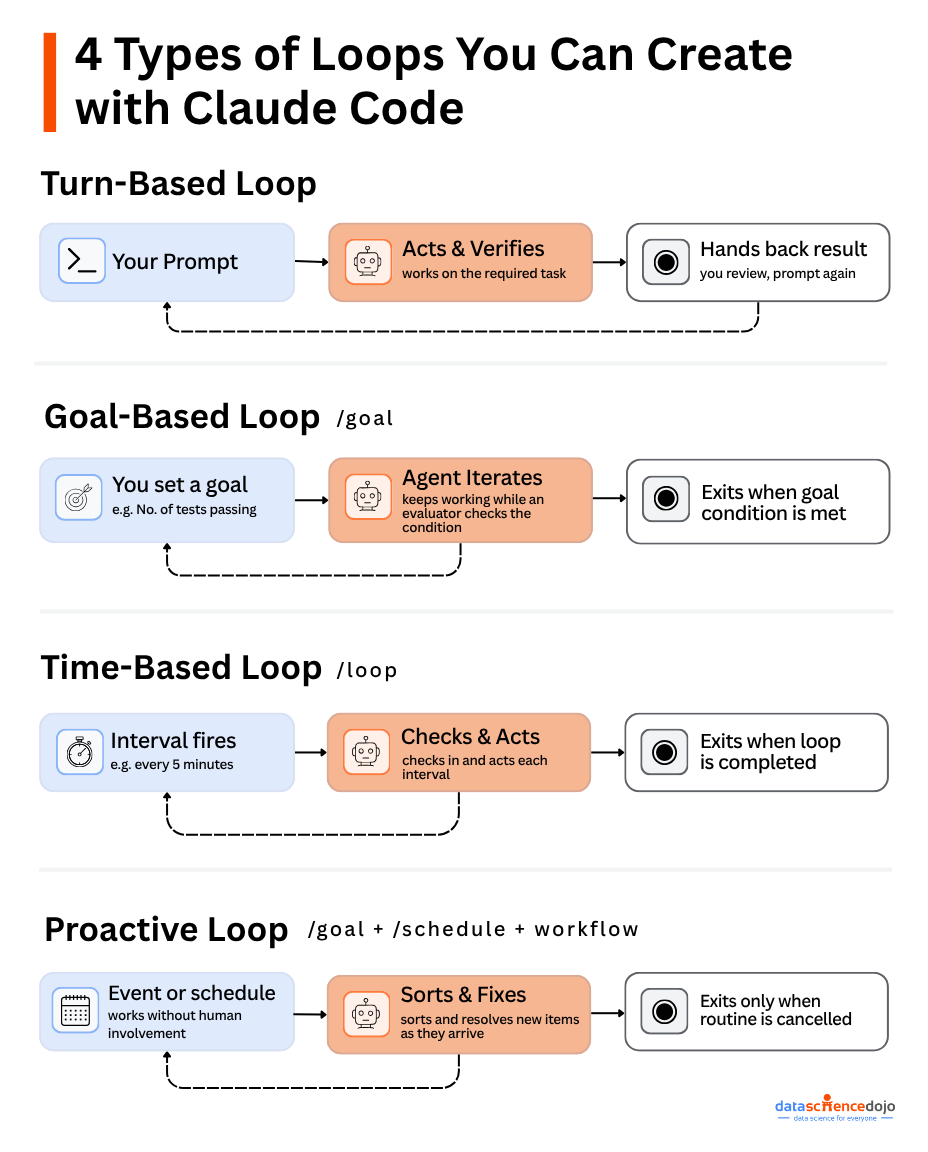
There are four types: turn-based, goal-based, time-based, and proactive – each one hands off a different piece of the work to the agent
Picking the right one comes down to one question: do you have a concrete finish line, or is the work ongoing.
Most teams we talk to are already running turn-based loops without calling them that. You prompt Claude, it edits a file, runs a check, and hands the result back to you. That’s a loop, just a short one.
What Anthropic’s Claude Code team has done is name the other three variants and draw a clean line between them: what starts the cycle, what ends it, and which Claude Code feature runs it. We think that framing is worth adopting as-is, because “loop engineering” as a phrase has gotten fuzzy enough that people use it to mean almost anything involving repetition.
Below, we walk through what distinguishes each type, where teams typically over- or under-use them, and a short way to try each one on your own work.
What Actually Makes Something a Loop
Strip away the tooling and every agent loop does the same four things: something triggers the agent, the agent acts, the agent (or something watching it) checks the result, and it either repeats or stops. The type of loop just determines who or what is doing the triggering and the checking.
A single prompt-and-response exchange isn’t a loop by this definition, it’s one pass through the cycle. The loop only exists once that cycle can repeat without you re-typing the same request. That distinction matters because it’s easy to think you need a complex setup when a single well-scoped prompt would do the job. Start with the simplest option and only add a loop primitive once you’ve actually hit its limits.
Turn-Based: The AI Agent Loop You’re Already Running
source: Claude Code Team
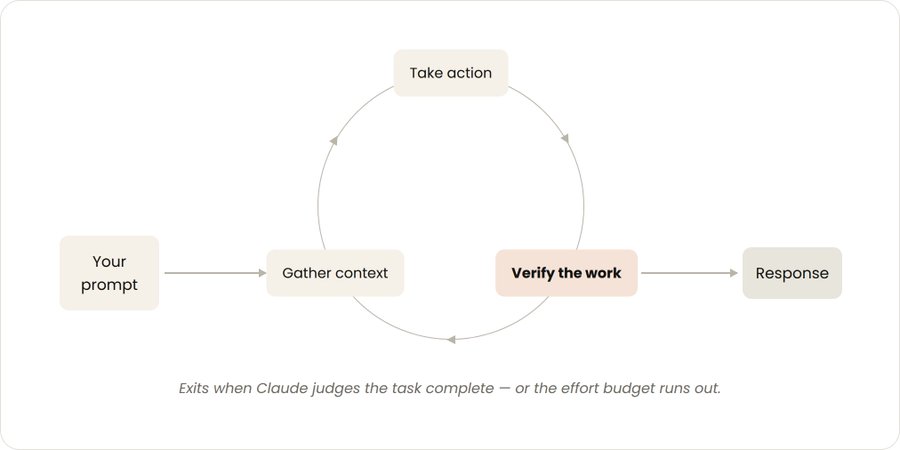
Trigger: A prompt you type.
Stops when: Claude decides the task is done, or decides it needs more from you.
Fits: Short, self-contained tasks you’re not planning to repeat.
Say you ask Claude to refactor a data cleaning function so it handles null values without breaking downstream joins. Claude reads the surrounding code, makes the edit, runs whatever tests exist, and hands you something it believes is correct. You look it over and either accept it or write the next prompt. That review-and-reprompt cycle is the entire loop. It just runs once per message instead of on its own schedule.
The lever you actually have here is how well Claude can check its own work before it hands the task back. If your review process lives entirely in your head, Claude can’t replicate it. Writing that process down as a skill file, “here’s how I’d manually verify this change”, gives Claude something concrete to run against instead of guessing at “looks right.”
Quick way to try it: Take a review step you do by hand every time (checking a query’s output against expected row counts, say) and write it as a short skill. Point Claude at it before your next prompt and see how much of that check it now runs itself.
Goal-Based: Handing Off the Finish Line, Not Just the Task
source: Claude Code Team
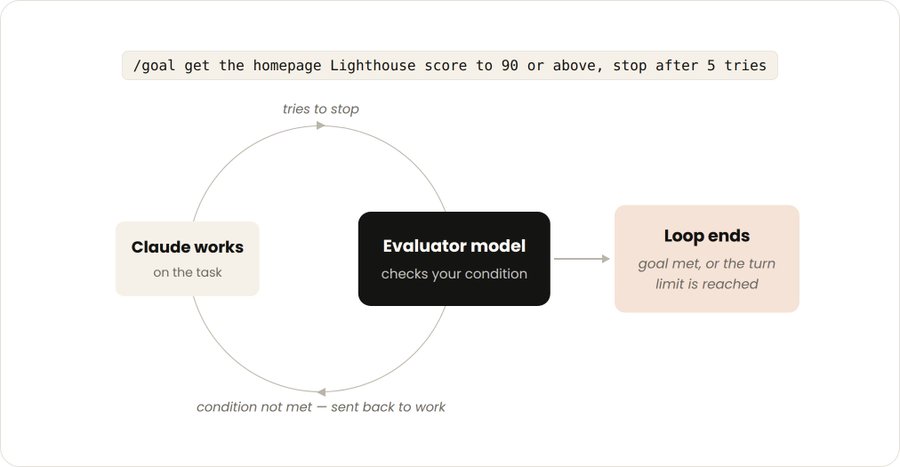
Trigger: A prompt, same as turn-based.
Stops when: The goal is met, or you hit a turn limit you set in advance.
Fits: Tasks where “done” can be measured, not just judged.
The difference from turn-based isn’t the trigger, it’s who decides when to stop. With /goal, you define the finish line up front instead of trusting Claude’s own sense of “good enough” partway through. An evaluator model checks your condition every time Claude tries to end the task, and sends it back to work if the bar hasn’t been cleared.
This only works well when the bar is something you can actually measure. “Get this model’s validation accuracy above 85%” gives the evaluator something concrete to check. “Make this model better” doesn’t. There’s no threshold to clear, so the loop has nothing to stop against except the turn cap.
Quick way to try it: Pick something you’re already tracking a number for; test coverage, a benchmark score, a lint error count and run /goal push [metric] above [target], stop after 5 tries against it.
Time-Based: Letting a Clock or a System Decide When to Check In
Trigger: An interval you set, or a change in something you’re watching.
Stops when: You cancel it, or the underlying job finishes.
Fits: Recurring tasks, or anything tied to a system that changes on its own timeline.
Some work doesn’t have a natural endpoint because the input keeps changing; a training job that might fail partway through and need a restart, or a data pipeline that should get re-checked after each nightly load. /loopre-runs a prompt on the interval you give it, so instead of babysitting a long-running job, you could set /loop 10m check whether the training run is still healthy, and restart it if it’s stalled.
The catch is that /loop only runs while your machine is on. Close your laptop and it stops. If you need the same check running independently of your own session, /schedule turns it into a routine that lives in the cloud instead of on your desktop.
Quick way to try it: Find something you currently check manually on a rough schedule (a dashboard, a job queue, a shared doc someone else edits) and replace that manual check with a /loop at roughly the same interval.
Proactive: Nobody Presses Go
source: Claude Code team
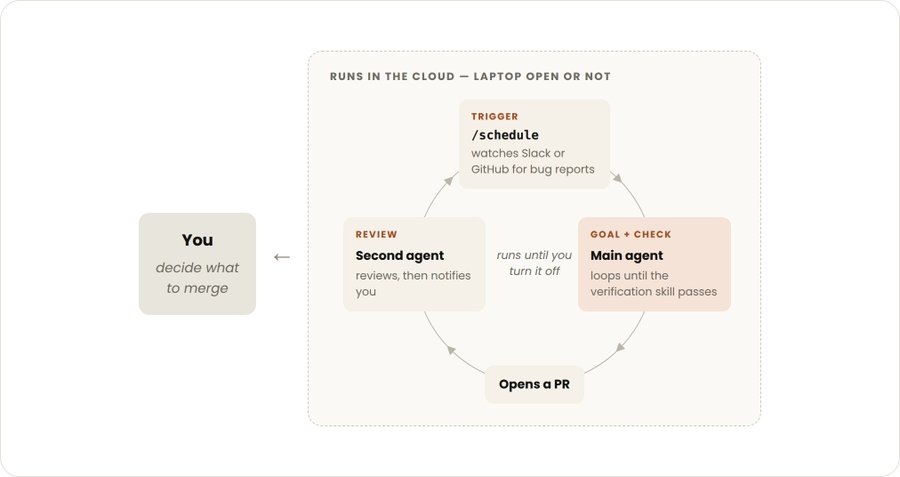
Trigger: An event or a schedule, with no one prompting in the moment.
Stops when: Each item that comes in gets resolved; the routine itself keeps running until someone turns it off.
Fits: Steady streams of well-defined work – triage, routine fixes, recurring reviews.
This is where the other three primitives get stacked together./schedulewatches for new work, /goal defines what “handled” looks like for each item, and a workflow orchestrates whatever agents are needed to get there, with auto mode letting the whole thing run without pausing for your approval at each step.
In practice, this looks like: every hour, check a queue of flagged model outputs, and for each one, don’t stop until it’s been reviewed, labeled, and routed to the right follow-up action. Nobody has to notice the queue or kick off the check, the routine notices for you.
We’d push back a little on jumping straight to this one. It’s the most autonomous of the four, which also means it’s the easiest to get wrong at scale before you’ve seen how it behaves on a handful of cases. Point it at something low-stakes first.
Quick way to try it: Before wiring up anything with real consequences, run /schedule against a single recurring, low-risk task – tagging new items in a backlog, say – so you can watch how it behaves before handing it anything bigger.
The Four, Side by Side
Loop type
Who/what triggers it
Who/what decides it’s done
Best fit
Turn-based
You, each time
Claude’s own judgment
Short, one-off work
Goal-based (/goal)
You, once
A measurable threshold
Work with a clear finish line
Time-based (/loop, /schedule)
A timer or interval
You cancel it, or it finishes
Recurring or external-system work
Proactive
An event or schedule
Each item’s own goal
Steady streams of defined work
Choosing Between /goal and /loop
These two get mixed up because both extend a task past a single exchange, but they’re solving different problems.
Reach for /goal when you can finish the sentence “this is done when ___” with something you could actually check; a score, a pass rate, a specific state. You’re handing Claude a finish line, and the evaluator holds it to that line every time it tries to stop.
Reach for /loop when there isn’t a finish line so much as an ongoing need to check back in, work that depends on something outside your control changing on its own schedule. You’re not defining “done,” you’re defining “how often to look again.”
If you’re not sure which one fits, ask whether the task would still make sense to run once and be finished. If yes, it’s a /goal candidate. If the honest answer is “it never really finishes, it just needs checking,” that’s /loop or /schedule territory.
These four types are really a snapshot of where Claude Code has landed today – if you want the fuller history of how agentic loops evolved to this point, including earlier patterns like ReAct, our breakdown of agentic loops and loop engineering traces that path in more depth.
What Breaks Loops in Practice
None of these four types hold up well without a decent system around them. A few things matter more than which primitive you pick:
A messy codebase produces messy loop output. Claude follows whatever conventions already exist, inconsistent or not – so cleaning up the surrounding code often does more for reliability than tuning the loop itself.
Claude can only verify what you’ve told it to check. Skills that spell out what “correct” looks like reduce how often you need to step in manually.
Stale docs create confidently wrong output. If the framework or library docs Claude references are out of date, it’ll work from outdated assumptions without flagging it.
A second agent catches what the first one won’t. An agent reviewing its own work shares the same blind spots that produced the work in the first place. A fresh-context reviewer doesn’t.
Token cost is the other thing worth watching, mostly because it’s invisible until it isn’t. Match the primitive to the size of the job – a two-line fix doesn’t need /goal, and a single script doesn’t need an agent reasoning through steps it could just run. Before pointing a proactive loop at a full backlog, test it on a handful of items first; dynamic workflows can spin up more agents than you’d expect once they’re running unattended, and that’s exactly where guardrails like bounded execution and circuit breakers – covered in our loop engineering design patterns guide – keep a loop from quietly running past its budget.
Where This Gets Misread
“A loop means the agent runs on its own.” Two of the four types, turn-based and goal-based, still start with you typing a prompt. The loop is what happens after that first message, not a replacement for it.
“A higher turn cap is always safer.” A goal-based loop without a genuinely measurable stop condition will happily burn through its turn cap without getting meaningfully closer to done. The cap is a backstop, not a substitute for a real finish line.
“Time-based and proactive are basically the same thing.” Time-based still needs you to set it up, and /loop specifically needs your machine to stay on. Proactive is the version built to run without anyone present – schedule, goal, and workflow combined so it can act on what it finds, not just flag it for you.
Model choice matters more here than it might seem. Claude Sonnet 5 was built to hold up across longer agentic stretches without losing the thread partway through – which matters most in exactly the loops that run the longest, goal-based and proactive.
FAQ
What’s the actual difference between an AI agent loop and just prompting Claude several times? Manually re-prompting means you’re deciding when to check in and when to stop each time. A loop moves that decision into the system itself, so the cycle keeps running without you re-typing the same request.
Do most tasks need /goal? No, most short tasks are fine as a turn-based loop. /goal earns its keep when the task has a measurable finish line and would otherwise take you several manual turns to get there.
Does a time-based AI agent loop keep running if I close my laptop? Not if you’re using /loop – it runs locally and stops with your machine. /schedule moves the same idea to the cloud so it keeps going independently.
What stops a proactive loop from running forever? Each individual task it picks up exits once its own goal is met. The routine itself keeps listening for new work until someone turns it off – that part isn’t meant to have a natural end.
What happens if a goal-based loop never actually meets its condition? It stops at whatever turn cap you set. That’s exactly why defining that cap matters – without one, there’s nothing to bound how long Claude keeps trying.
For how these loop mechanics connect to the layer just underneath them, how an agent decides when and how to use a tool versus when to lean on a reusable skill, see our breakdown of agent skills versus tools.
Want to build AI agents that can reason, plan, and execute autonomously?