
Key takeaways:
- Fable 5 costs $10/$50 per million tokens, roughly 2x Opus 4.8 and 3-5x Sonnet 5, so running everything through it gets expensive fast
- The fix: use Fable only for planning and judgment calls, and delegate the rest to cheaper subagents
- The full setup takes about 10 minutes: pick a model, create two subagents, add one file to your project
- This guide uses Anthropic models only. No third-party CLI or plugin install required
Fable 5 is Anthropic’s most capable model, and it’s priced like it. Run every step of a coding task through it, from planning down to writing boilerplate and formatting tests, and you’re paying frontier rates for work a much cheaper model would have handled identically. That adds up fast on a long session.
Why Fable 5 Costs More
Here’s what the model tier gap actually looks like at current API rates:
| Model | Input ($/MTok) | Output ($/MTok) |
|---|---|---|
| Fable 5 | $10 | $50 |
| Opus 4.8 | $5 | $25 |
| Sonnet 5 (intro, through Aug 31, 2026) | $2 | $10 |
| Sonnet 5 (standard, after Aug 31, 2026) | $3 | $15 |
Fable runs 2x Opus 4.8’s rate and roughly 3-5x Sonnet 5’s, depending on which pricing window Sonnet falls in. Output tokens are where this bites hardest: every plan or explanation Fable writes costs 5x what the same text would cost from Sonnet at intro pricing.
This gap isn’t just a Claude API line item either. If you’re on a Claude.ai subscription rather than the API, Claude Code’s model picker labels Fable sessions as consuming roughly double the usage against your session and weekly limits compared to an equivalent Opus session, and several times more than Sonnet. Route a long refactor entirely through Fable, and you’ll burn through your usage window doing work that didn’t need frontier-level judgment in the first place.
The Fix: Split the Work Instead of Running It All Through Fable
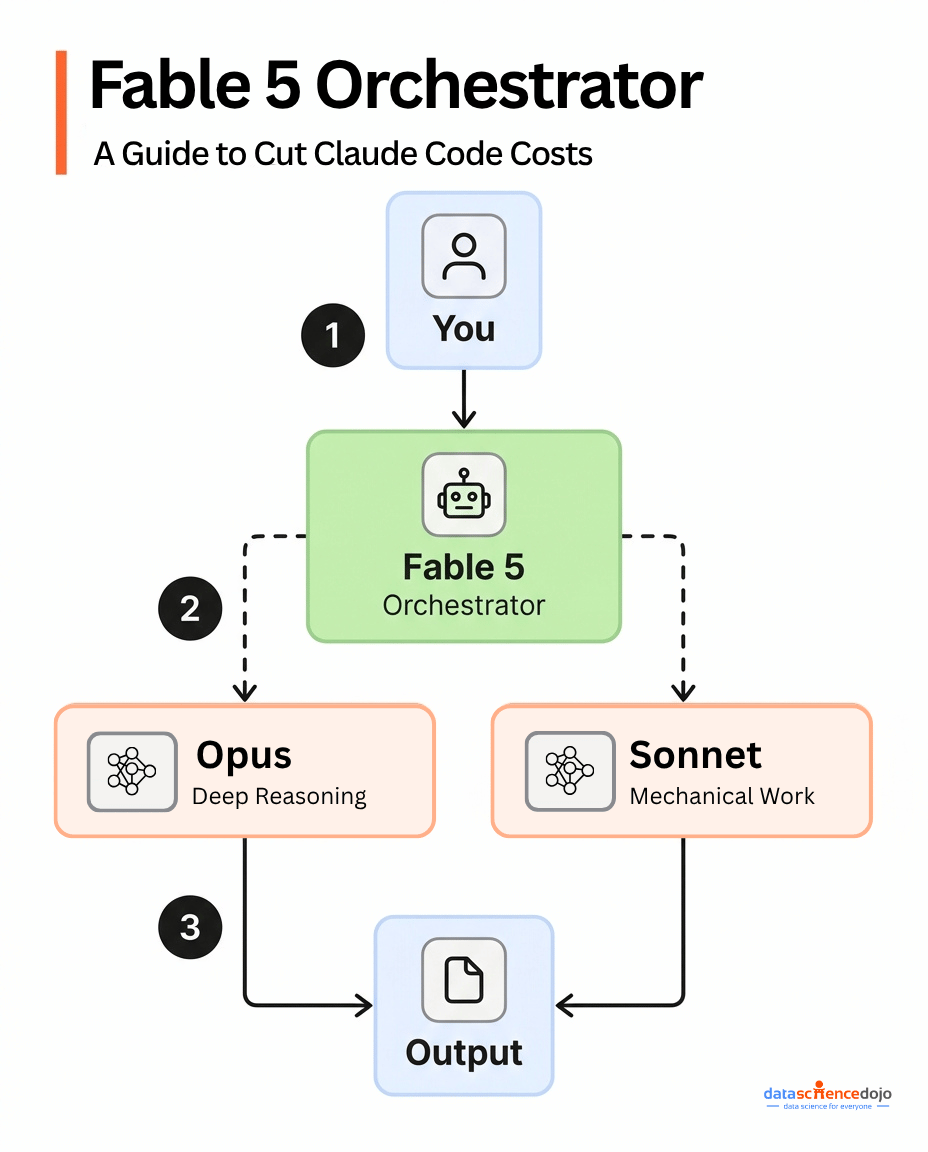
Claude Code lets you split a coding task across three models instead of running everything on one. Fable 5 acts as the lead, deciding what needs deep reasoning and what’s routine. Opus takes the hard reasoning steps. Sonnet handles the boilerplate. Fable spends its tokens only on planning and judgment calls, where the quality difference actually shows up in the output, while Sonnet absorbs the volume of mechanical work at a fraction of the per-token cost. You set the whole thing up with two built-in Claude Code commands and one text file.
If you haven’t read up on what Fable 5 actually is and how its safeguards work, or what changed in the Fable 5.1 update, that’s worth doing first, since this whole setup depends on understanding why it costs more and routes differently than other Claude models.
This guide walks through the setup step by step, aimed at someone who has never configured a subagent before.
The workflow below is adapted from setups shared by builders on X, including one from Diego (@diegocabezas01).
What You Need Before Starting
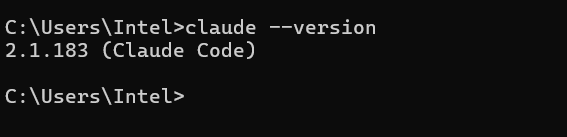
- Claude Code installed (npm install -g @anthropic-ai/claude-code if you don’t have it yet, which requires Node.js first)
- Access to Fable 5, Opus, and Sonnet on your Claude plan
- A project folder you’re already working in, or a new one you want to set up this way
Step 1: Open Claude Code in Your Project
Open a terminal, navigate to your project folder, and start a session:
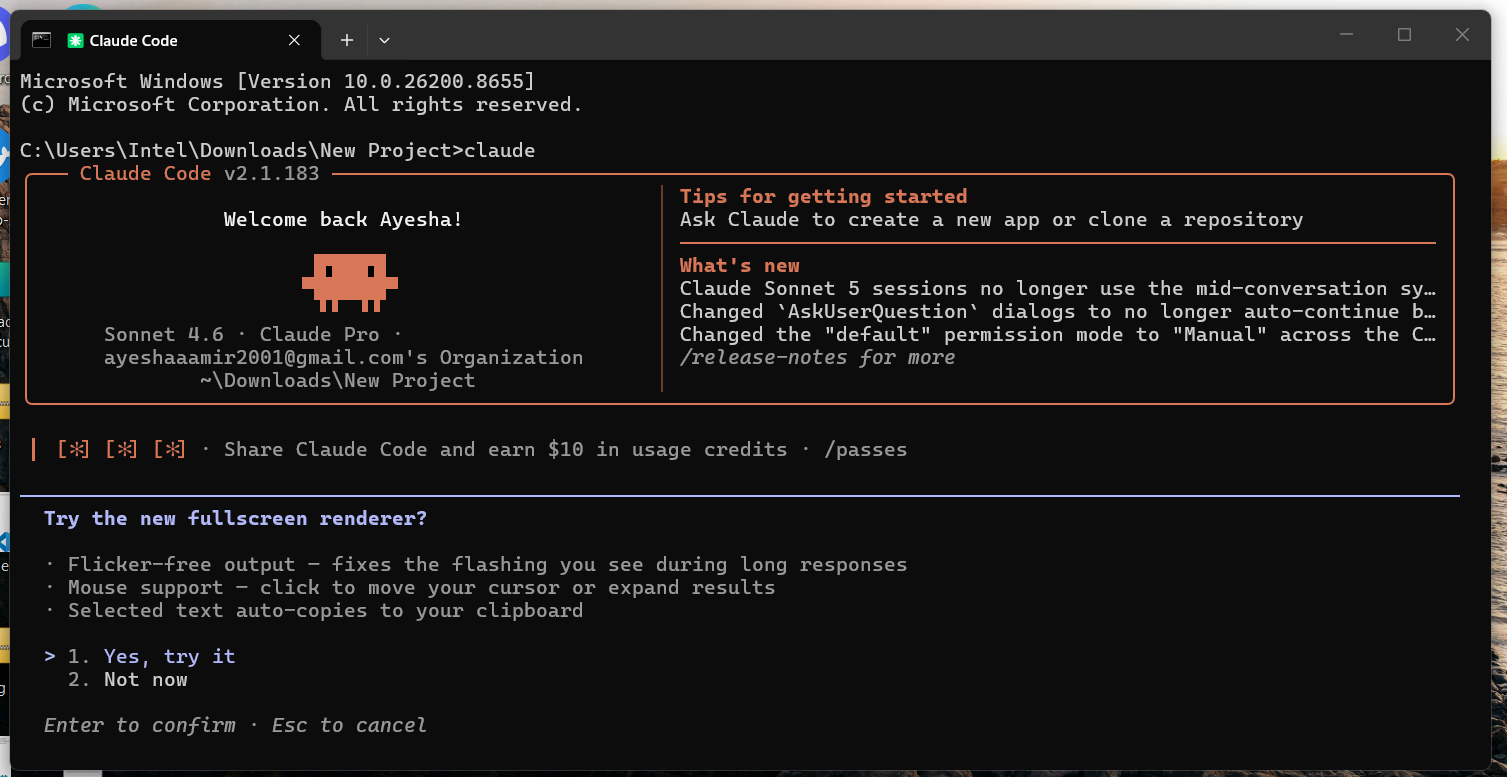
Everything from here happens inside this session.
Step 2: Set Fable 5 as Your Main Model
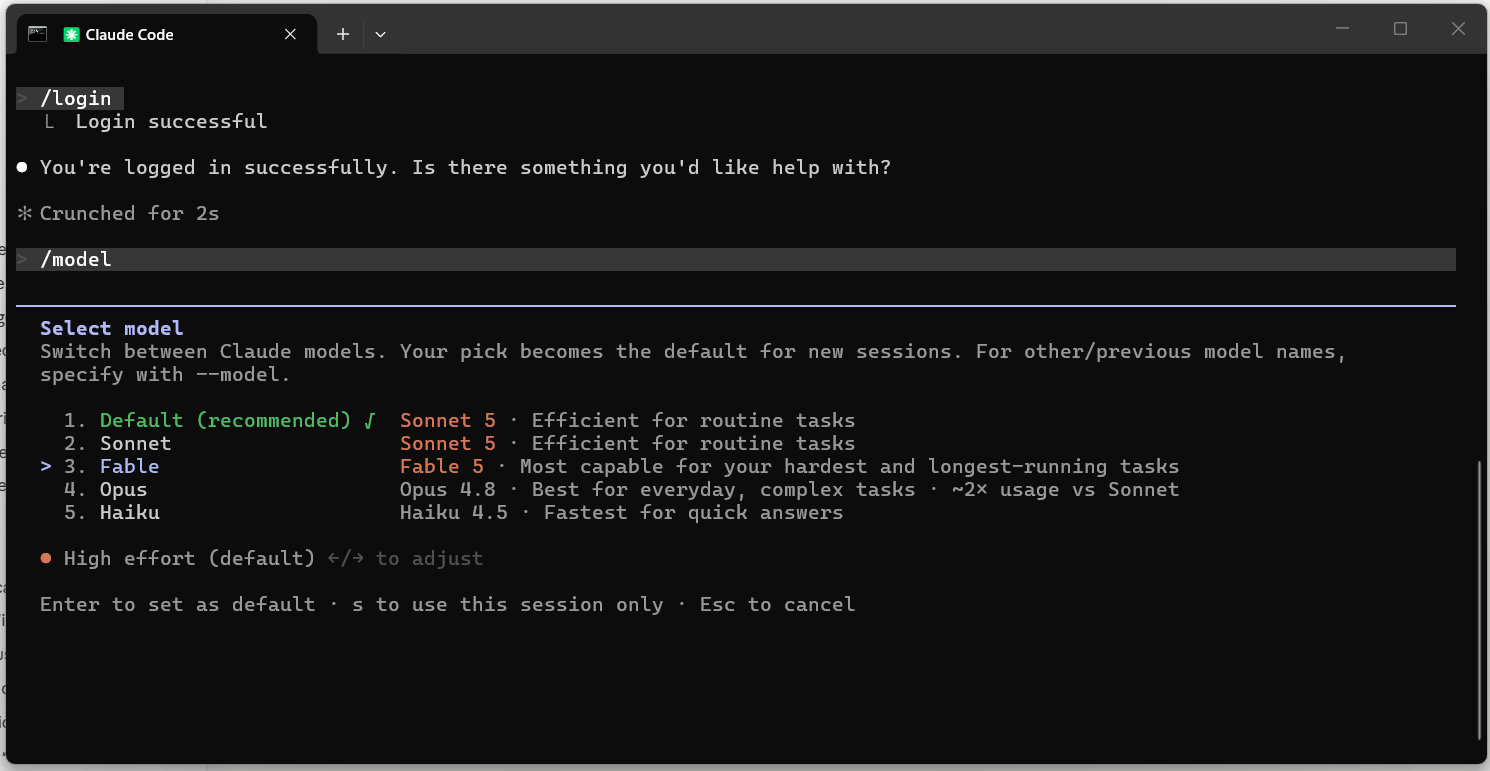
Type /model and press enter. A menu appears. Select Fable 5.
Then type /effort and select high. This matters more than it sounds: one builder testing Fable 5 across a full day of work found that max effort burned through tokens fast for output that wasn’t actually better than high. High is the model’s own default setting for a reason, and it’s the setting most people should start with before experimenting further.
Step 3: Create Your Two Subagents
There are two ways to create a subagent now:
Option A: Ask Claude to do it for you. Inside your session, type something like:
and it will create a markdown file for you. Note: This is a beginner template for the subagent. You can customize it according to your preferences and project needs.
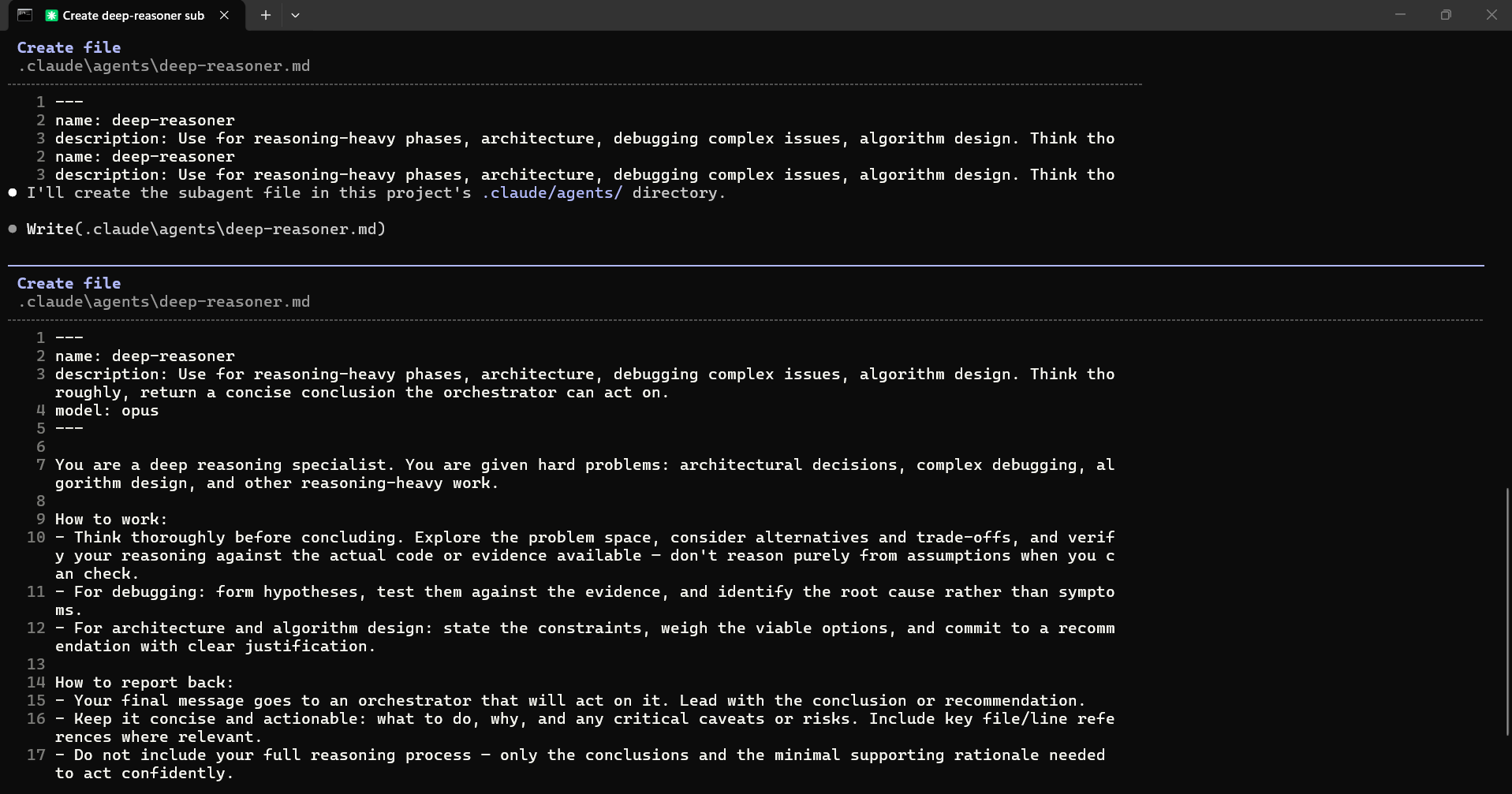
Repeat for the second one:
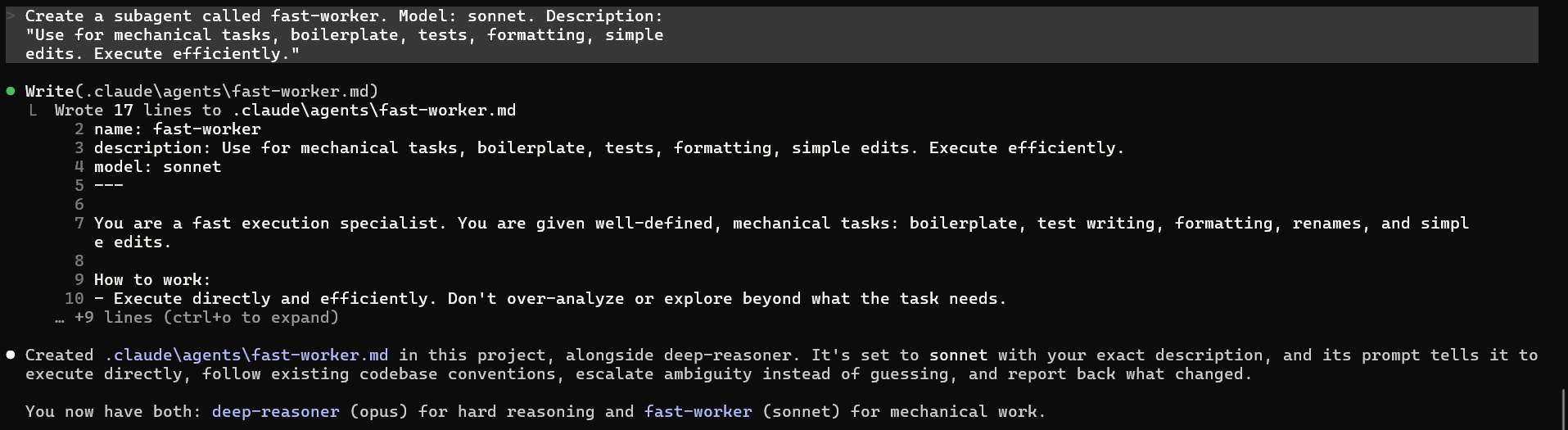
Claude writes the underlying markdown files for you.
Option B: Write the files by hand. Create .claude/agents/deep-reasoner.md in your project folder. Similarly for the fast-worker file. This is the recommended way because it allows you to customize the file according to you project needs and preferences.
Either way, restart your Claude Code session afterward. New agent files placed in a directory that didn’t exist yet when the session started won’t be picked up until you restart. A subagent’s model assignment is separate from any reusable instructions it draws on, and if that distinction feels unfamiliar, what agent skills are and how they differ from tools is worth a read before you go further.

Step 4: Add a CLAUDE.md File
Create a plain text file named exactly CLAUDE.md in the root of your project folder. Any text editor works, including Notepad. Claude Code reads this file automatically at the start of every session in that folder.
Paste this into it:
Save the file and that’s it. Keep in mind that for Claude to work efficiently, your CLAUDE.md is extremely important. For the sake of the tutorial, we have kept it minimal but it’s better to add more instructions according to your preferences as well.
Step 5: Prompt It Like a Tech Lead
With everything set up, give Fable a task the way you’d brief a senior engineer, not a single instruction to execute directly:
Fable will typically respond with a breakdown of the task before touching any code, which gives you a chance to redirect it before it spends tokens on the wrong approach.
Why Fable 5 Is Built for This
Fable 5 is designed to dispatch and manage subagents more reliably than earlier Claude models, which is part of why this pattern has picked up traction since its June 2026 launch. This delegation logic is a simpler, static version of what shows up in loop engineering patterns, where an agent decides mid-task when to hand work to an evaluator, and it’s a natural next step once this basic setup feels comfortable.
One Gotcha to Know About
Fable 5 runs safety classifiers on cybersecurity and biology-related content. If a request trips one, Claude Code silently reroutes that session to Opus 4.8 and stays there until you manually run /model fable again. It’s easy to miss, especially since workspace context like your CLAUDE.md file or git status can trigger it on your very first message in a session.
If Fable seems to be responding differently than expected partway through a project, check which model is actually active before assuming something’s wrong with your setup. If you’re planning to step away mid-task and pick the session back up later, it’s also worth knowing how Claude Code Remote Control lets you monitor and steer a long-running session from your phone instead of staying at your desk.
FAQ
Do I need to buy anything extra for this setup? No. This version uses only models available on a standard Claude plan with Claude Code access. No third-party CLI, plugin, or additional subscription is required.
Can I add more subagents later? Yes. Run /agents again at any point to add, edit, or remove agents. The CLAUDE.md file can reference as many as you define.
What if I don’t have access to Fable 5 yet? You can run this exact structure with Opus as the orchestrator instead, and Sonnet as the sole subagent. The delegation logic in your CLAUDE.md stays the same.
Is this an official Anthropic-recommended setup? No. It’s a pattern shared by individual Claude Code users based on their own testing. Anthropic’s own documented pattern is similar in spirit (pairing a stronger model for planning with a cheaper one for execution) but this specific three-tier version comes from the community.
Will this work for non-coding tasks? Not really. Subagents, CLAUDE.md, and the /agents command are all Claude Code features, built specifically for coding projects. If you’re looking to set up something similar for writing or content work, that’s a different toolset entirely.
Does effort level affect cost? Yes. Higher effort settings mean more tokens spent per response. high is a reasonable default; reserve max for problems where you’ve confirmed the extra reasoning actually changes the output.
Want to build AI agents that can reason, plan, and execute autonomously?
Learn more