
Key Takeaways
- Claude Design launched on April 17, 2026. Anthropic's boldest move beyond chatbots, turning Claude into a full prototyping engine that outputs live HTML, CSS, and React
- Google Stitch evolved from a single-screen experiment at Google I/O 2025 into a multi-screen AI canvas with voice commands and interactive prototyping by March 2026
- Figma's stock has fallen ~35% year-to-date in 2026 — the market is already pricing in a design tools disruption that product teams need to understand now
The honest answer is more interesting than either extreme. To understand what’s really happening, you need to look at both tools in detail — what they do, how they differ, and what each one means for designers, product managers, and developers trying to move faster in 2026.
Claude Design vs. Google Stitch: Feature-by-Feature Breakdown
| Feature | Claude Design | Google Stitch |
|---|---|---|
| Launch | April 17, 2026 | May 2025 (major update March 2026) |
| Underlying AI | Claude Opus 4.7 | Gemini 2.5 Flash / Gemini 2.5 Pro |
| Output type | Live HTML, CSS, React components | UI mockups + HTML/TailwindCSS |
| Multi-screen | Yes | Yes (up to 5 screens per generation) |
| Brand/design system | Auto-ingests codebase + design files on onboarding | URL extraction + DESIGN.md file |
| Voice input | No (at launch) | Yes — real-time design critique via voice |
| Figma export | No — exports to Canva, PDF, PPTX, HTML | Yes — paste directly to Figma |
| Developer handoff | Native Claude Code handoff bundle | AI Studio and Antigravity integration |
| Collaboration | Org-scoped sharing + group conversation editing | MCP server, SDK, Agent manager |
| Pricing | Free tier with limits; Pro at $20/month | Free via Google Labs |
| Best for | Enterprise product teams, code-accurate prototypes | Individual designers, fast ideation, Figma workflows |
What Is Claude Design? Anthropic's New Creative Workspace
Claude Design is a new product from Anthropic Labs that lets you collaborate with Claude to create polished visual work — designs, prototypes, slide decks, one-pagers, and more. It is powered by Claude Opus 4.7, Anthropic's most capable vision model, and is currently available in research preview for Claude Pro, Max, Team, and Enterprise subscribers.
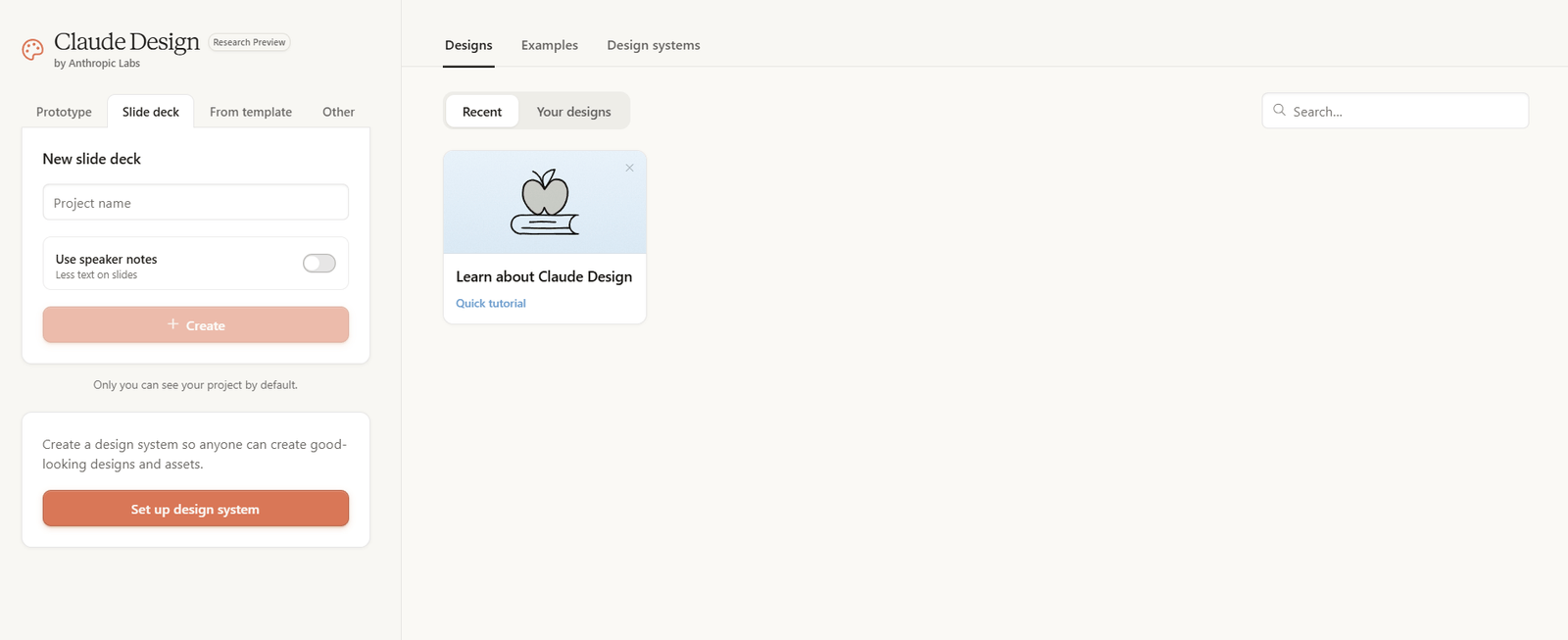
The key distinction worth understanding immediately: Claude Design is not an image generator. It is a prototyping engine. When you describe what you need — a landing page, a dashboard, a checkout flow — Claude builds a first version as live HTML, CSS, and React components that render in real time. You are not getting a static mockup to send to a developer. You are getting code.
This matters because it closes the gap between design and development in a way that earlier AI tools couldn’t. As we explored in our breakdown of Claude vs. ChatGPT, one of Claude’s consistent strengths has been its ability to reason about code and structure simultaneously — and Claude Design is exactly what happens when that capability gets a dedicated creative surface.
How the Workflow Works
The experience follows a natural creative loop. During onboarding, Claude reads your team's codebase and design files to build a design system automatically. Every project that follows uses your brand's colors, typography, and components without you having to specify them again. Teams maintaining multiple design systems — say, one for a consumer product and one for an enterprise dashboard — can manage both.
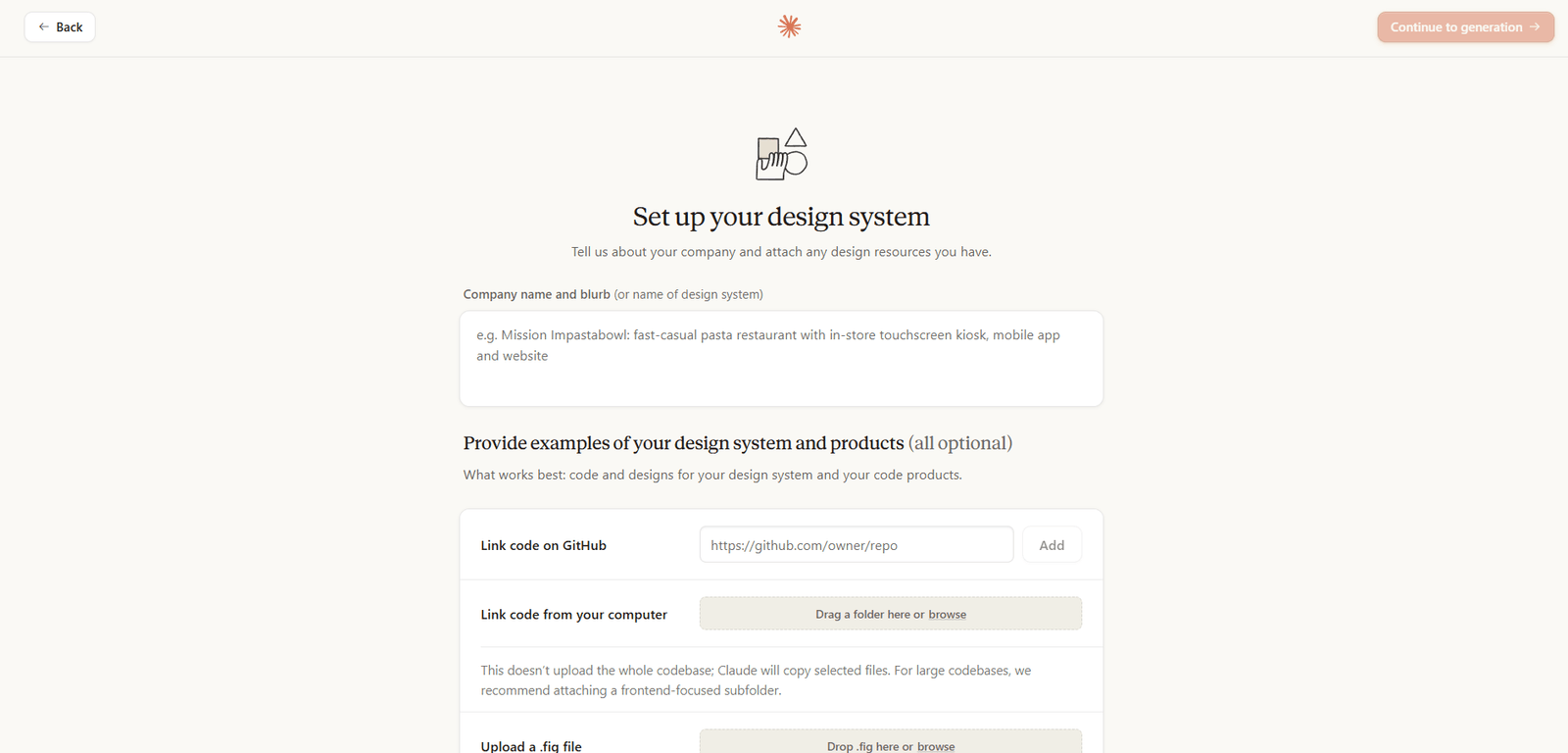
From there, you can start a project in several ways: a text prompt, an uploaded document (DOCX, PPTX, XLSX), a screenshot of your existing product, or by pointing Claude at your codebase. There is also a web capture tool that pulls visual elements directly from your website so that prototypes look like the real thing rather than a generic template.
Refinement happens through conversation. You can comment inline on specific elements, edit text directly, use adjustment knobs to tweak spacing and color in real time, and ask Claude to apply any of those changes across the entire design in one instruction. When a design is ready to hand off, Claude packages everything into a bundle that you pass to Claude Code with a single instruction — no manual spec writing, no back-and-forth briefs.
Who It's Built For
The clearest use cases Anthropic has highlighted:- Designers who want to explore more directions quickly and turn static mockups into shareable interactive prototypes without a code review cycle
- Product managers who need to sketch feature flows and hand them off directly to engineering or to designers for refinement
- Founders and marketers who need a pitch deck or landing page and do not have a design background
- Enterprise teams who want code-accurate, brand-consistent prototypes at scale
What Is Google Stitch? From Experiment to Figma Rival
Google Stitch launched quietly at Google I/O in May 2025 as a Google Labs experiment. The pitch was simple: describe a UI in plain English, and Stitch generates a screen for you. It was fast, impressively accurate for a first version, and clearly a test of appetite. The market responded with enthusiasm, and less than a year later, Stitch is a fundamentally different product.
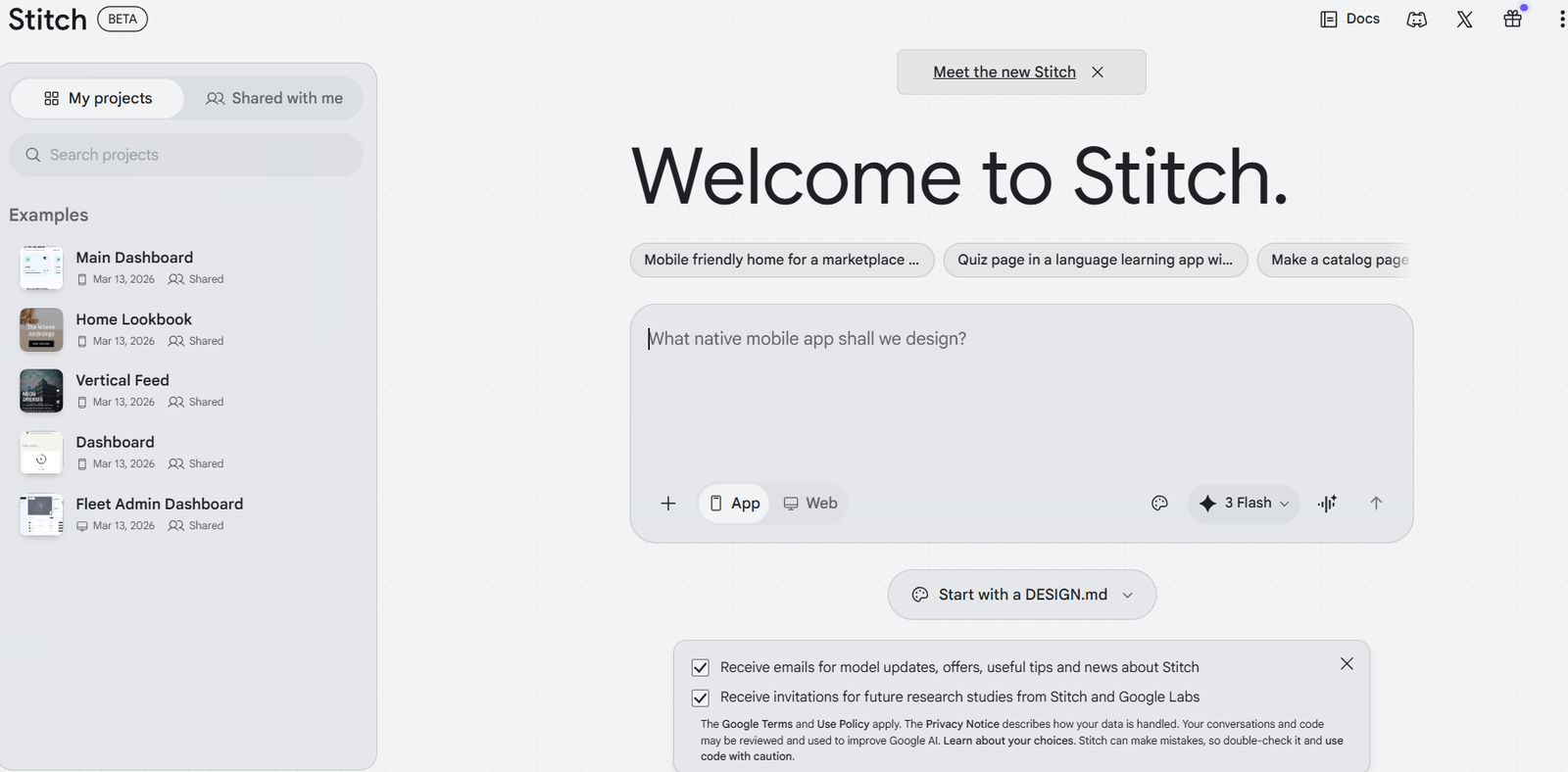
The March 2026 update transformed Stitch into an AI-native software design canvas. Where the original tool generated single screens, the new version generates up to five interconnected screens simultaneously from a single natural language description. Where the original had a basic prompt input, the new version has an infinite canvas, a design agent that tracks the project’s evolution, voice commands, and an Agent manager that lets you work on multiple design directions in parallel.
Stitch’s origins trace back to Galileo AI, a startup founded in 2022 that built one of the earliest text-to-UI tools. Google acquired Galileo AI in early 2025 and rebranded it as Stitch, integrating it with the Gemini model family. This acquisition context matters: Stitch is not a side experiment Google spun up to test generative UI. It is Google’s most serious attempt to enter the professional design tools market, and it is backed by Gemini’s multimodal reasoning.
The Two Modes
Stitch runs on two versions of Gemini depending on what you need:- Standard Mode uses Gemini 2.5 Flash — fast, good for text-based prompt generation, supports Figma export, and gives you 350 generations per month
- Experimental Mode uses Gemini 2.5 Pro — higher-fidelity output, accepts image inputs (sketches, screenshots, wireframes), and gives you 200 generations per month
What the March 2026 Canvas Introduced
The infinite canvas is the most significant structural change. Traditional design tools give you a blank page and expect you to fill it. Stitch's canvas is intelligent — it understands the project's entire history, can suggest next screens based on a user's likely journey through the app, and allows you to bring in context from images, text, or code directly onto the canvas.Voice is the other major new capability. You can speak to the canvas directly — asking for real-time design critiques, requesting layout variations, or triggering specific changes like “show me three different menu options” while a design is open. This is not a gimmick. For designers who think out loud or work with stakeholders during live reviews, voice interaction meaningfully changes how feedback loops work.
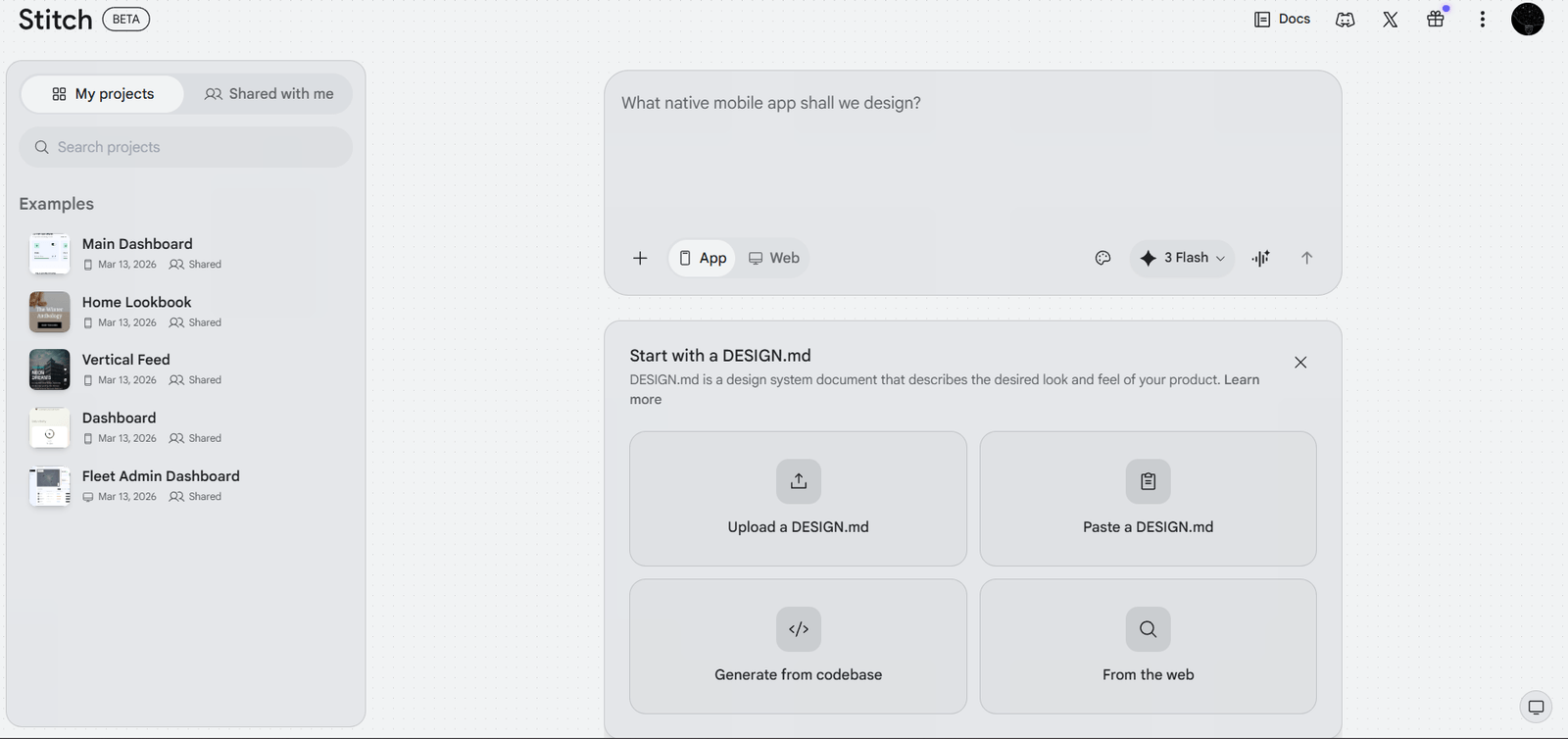
Stitch also introduced DESIGN.md — an agent-friendly markdown file that lets you export or import your design rules to and from other tools, including other Stitch projects. This addresses one of the biggest practical friction points in AI design tools: the inability to carry brand context across projects without starting from scratch.
Where Claude Design Pulls Ahead
The strongest argument for Claude Design is the depth of its enterprise workflow integration. The design system ingestion during onboarding is not a feature you will find in Stitch — it means that from project one, every output reflects your actual brand rather than a generic interpretation of it. For teams managing complex visual identities across multiple products, this alone justifies the switch for prototyping work.The Claude Code handoff is the other structural advantage. When a prototype is ready to build, Claude packages the entire design context into a bundle that passes directly to Claude Code. There is no specification document to write, no annotated Figma file to export, no brief to translate. The design and the implementation instructions are one artifact. Given how much time is lost in most product teams at exactly this handoff moment, this is a meaningful efficiency gain.
Product teams at companies like Datadog have reported going from rough idea to working prototype before a meeting ends, with the output staying true to brand guidelines without manual correction. Brilliant’s design team noted that pages requiring 20+ prompts in other tools only needed two prompts in Claude Design. These are not generic testimonials — they reflect a genuine reduction in friction at the most painful parts of the design cycle.
Understanding why Claude performs so well here requires some context about how the underlying model has evolved. For a deeper look at how Claude 3.5 Sonnet introduced Artifacts — the feature that laid the groundwork for Claude Design’s real-time rendering — that post explains the architectural shift that made this possible.
Where Google Stitch Pulls Ahead
Stitch's multi-screen generation is its most practically powerful feature. Describing a full application flow and receiving five interconnected, coherent screens in one operation is something Claude Design does not currently offer at the same fidelity. A product manager who needs to communicate an entire checkout flow — cart, shipping, payment, confirmation, order tracking — can have that as a coherent design artifact in a single Stitch prompt.The Figma integration is the other reason Stitch fits better into many existing workflows. Designers who live in Figma do not want to abandon it — they want faster ideation before they open Figma. Stitch’s paste-to-Figma function makes that transition seamless. Claude Design, by contrast, is building a parallel workflow that competes with Figma rather than plugging into it.
Stitch is also genuinely free in a way that matters for independent designers and early-stage teams. 350 standard mode generations per month is enough for rapid prototyping without any subscription cost. Claude Design requires a Pro plan at $20/month for meaningful access beyond the free tier — which is still competitive, but it is not free.
Voice-driven design critique is a genuine differentiator that is hard to overstate for teams that work collaboratively. The ability to talk through a design with an AI agent that responds in real time — making adjustments, offering critiques, suggesting alternatives — is a fundamentally different mode of working than typing prompts in a chat interface.
Pricing: What Do These Tools Actually Cost?
| Plan | Claude Design | Google Stitch |
|---|---|---|
| Free | Available with generation limits | Free via Google Labs (350 standard/200 pro generations/month) |
| Paid | Claude Pro at $20/month (included in subscription) | No paid tier announced yet |
| Team/Enterprise | Claude Team and Enterprise plans (admin controls, org sharing) | Not yet available |
What This Means for Designers, PMs, and Developers in 2026
The question most teams are actually asking is not "which tool wins" — it is "which tool do I reach for and when." The answer follows logically from what each tool prioritizes.Reach for Claude Design when:
- You need a code-accurate prototype that reflects your actual brand and design system
- Your next step after prototyping is sending something to an engineering team
- You are working within the Anthropic ecosystem and want Claude Code to implement the design
- Your team needs org-scoped collaboration with version tracking inside a single tool
- You need to generate multiple screens of a full application flow in one operation
- Your existing workflow centers on Figma and you need faster ideation before opening it
- You are an independent designer or early-stage team where free access matters
- You want to extract a design system from an existing URL and use it as a starting point
For teams that want to understand how the underlying models power these capabilities, our guide to the best large language models covers the model families that both tools are built on, including Gemini’s multimodal architecture and Anthropic’s approach to instruction following and code generation.
The Bigger Picture: Who Wins the AI Design Wars?
Neither tool is a Figma killer yet. Both are genuinely missing things that production design teams depend on — precise vector editing, persistent component libraries with tokens, deep developer handoff with measurements and annotations, plugin ecosystems, and the kind of version history that large teams need to work without overwriting each other. These are not small gaps.But the trajectory matters as much as the current state. Stitch went from a single-screen experiment to a five-screen canvas with voice and interactive prototyping in under a year. Claude Design launched with design system ingestion, Claude Code handoff, and org-level collaboration on day one. Both companies are investing heavily and iterating fast.
The financial markets have already drawn a conclusion. Figma shares fell more than 4% in the days following the March 2026 Stitch update and are down roughly 35% year-to-date. That is not just sentiment — it is institutional capital pricing in a fundamental shift in how design tools will work. This pattern mirrors what the generative AI art tools space went through between 2022 and 2024, where established creative software providers were forced to restructure their product roadmaps around AI-native competitors.
What is clear is that the “design handoff problem” — the friction-heavy translation of visual intent into buildable code — is being solved at the model level rather than the tooling level. Claude Design solves it by making the design output be the code. Stitch solves it by integrating into Figma so that the code generation happens downstream. Both approaches are valid, and both will continue to improve.
The teams that win in this environment are not the ones that pick the right tool in April 2026 — they are the ones that build the organizational habit of evaluating and integrating these tools as they evolve. For teams already building AI-powered workflows and want to understand the underlying model landscape better, the LLM guide for beginners is a practical starting point for understanding what makes these tools work the way they do.
FAQ: Claude Design and Google Stitch Explained
Is Claude Design free? Claude Design has a free tier with usage limits. Full access — including longer conversations and higher usage limits — is included in a Claude Pro subscription at $20/month. It is also available on Claude Max, Team, and Enterprise plans.Is Google Stitch free? Yes. Google Stitch is currently free through Google Labs. Standard mode gives you 350 generations per month, and Experimental mode (higher fidelity, supports image input) gives you 200 generations per month. Google has not announced a paid tier as of April 2026.
Does Claude Design replace Figma? Not for production design work. Real-time multi-editor collaboration, persistent component libraries, precise vector editing, and developer handoff with measurements are areas where Figma still leads. Claude Design bypasses Figma for many early-stage use cases — prototyping, wireframing, pitch decks — but it is not a replacement for teams doing production-level UI work.
Can Google Stitch export to Figma? Yes. In Standard Mode, Stitch includes a paste-to-Figma function that lets you move generated designs directly into a Figma file for further editing. Experimental Mode does not currently support Figma export.
Who is Claude Design best for? Product teams, PMs, designers, and founders who want prototypes that are code-accurate, brand-consistent, and ready to hand off to engineering — particularly those already using Claude Code in their development workflow.
What language does Claude Design export code in? Claude Design generates HTML, CSS, and React components. Google Stitch exports HTML and TailwindCSS.
Can I use both tools together? Yes, and for many teams this makes sense. Stitch is stronger for rapid multi-screen ideation and Figma-compatible flows; Claude Design is stronger for code-accurate prototyping and enterprise brand consistency. Using Stitch to explore directions and Claude Design to produce the final handoff artifact is a workflow worth considering.
Conclusion: The Design Workflow Is Being Rewritten
The AI design wars of 2026 are not a zero-sum competition. Claude Design and Google Stitch are solving adjacent problems in adjacent ways, and the result is that teams have more capability than ever to close the gap between an idea and a working product.The practical takeaway is this: if you are a product team or designer who has not yet built a prototyping workflow around AI tools, the cost of staying on the sideline is rising. Both tools are accessible right now — Claude Design through claude.ai/design, Google Stitch through stitch.withgoogle.com — and both have free or low-cost entry points that make experimentation essentially free.
The companies that figure out when to use each tool, and how to integrate both into their existing workflows, will not just move faster. They will build better products because the feedback loop between idea and prototype has been compressed from days to minutes.
For teams that want to go deeper on the models powering these tools, exploring Anthropic’s Claude 3 model family provides useful context on how Anthropic’s approach to reasoning and code generation has evolved into what powers Claude Design today.
Want to build AI agents that can reason, plan, and execute autonomously?
Learn more